How Do I Reset My Server's Data?
The Danger Zone in your server settings lets you reset specific parts of your economy. Each reset is permanent and cannot be undone, so make sure you know what you're clearing before you proceed.
Written By Adam
Last updated 7 months ago
How to Access the Danger Zone
Go to the Points dashboard, click your avatar in the top right, and select Servers
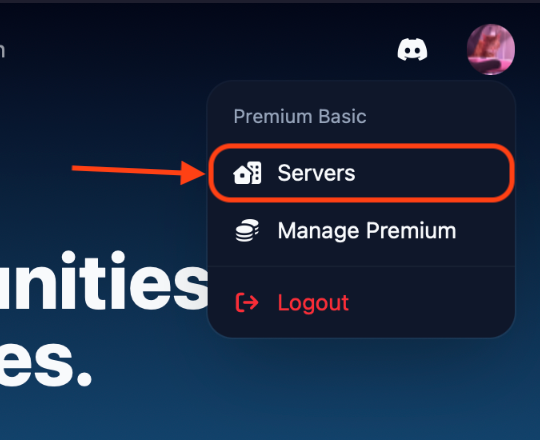
Click on the server you want to manage
Head to the Settings page, then scroll to the very bottom to find the Danger Zone

What Each Reset Does
Reset Bank
Clears the server's bank balance back to zero. Member balances are not affected. Use this if you want to start the bank fresh. For example when switching to Advanced Economy Mode.
Reset Backpacks
Deletes all purchase records for every member. Members will lose their purchase history and any items tied to those purchases. The items themselves remain in your shop.
Reset Balances
Sets every member's point balance to zero. The server bank and purchase history are not affected.
Reset Rewards
Clears all reward cooldown timers for every member. Everyone will be able to claim their daily, weekly, monthly, and yearly rewards immediately as if for the first time.
Reset to Default
A full wipe. This resets everything at once:
All member balances → 0
Server bank balance → 0
All purchase history deleted
All shop items deleted
All reward cooldowns cleared
All settings (visibility, taxes, embeds, roles, etc.) restored to defaults
Warning: Reset to Default is irreversible. Only use this if you want to start your entire economy from scratch.
Who Can Use These Controls?
Only server administrators (users with the Discord Administrator permission or the server owner) can access and use the Danger Zone.
If you accidentally reset the wrong data, there is no way to recover it. When in doubt, use the more targeted reset options rather than Reset to Default.