Why Am I Getting Points for Sending Messages?
Points can be configured to automatically reward members for sending messages in your server. If members are seeing their balance go up without using any commands, message rewards are most likely enabled.
Written By Adam
Last updated 7 months ago
How It Works
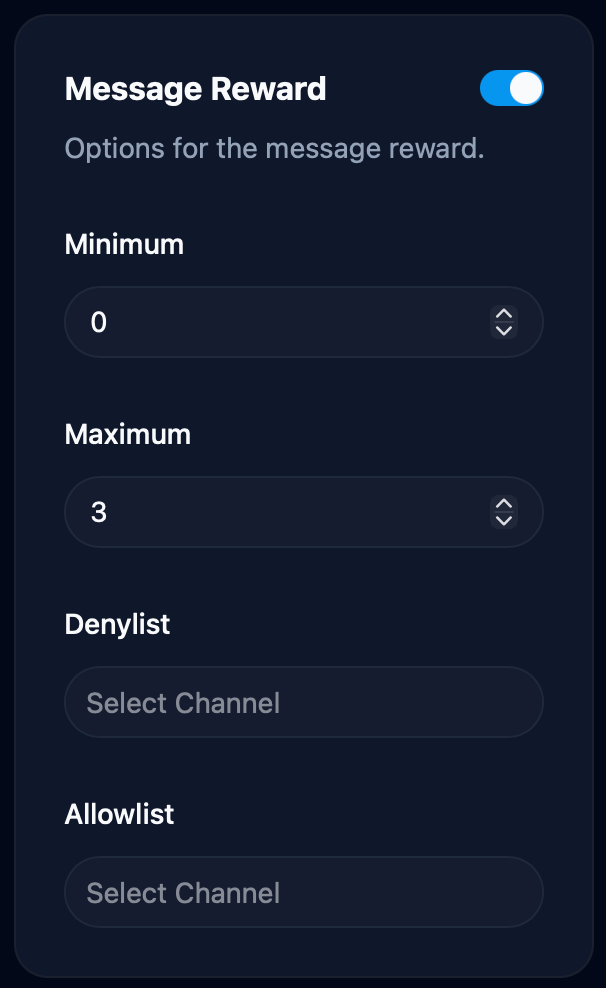
Every time a member sends a message, Points awards them a random number of points within a configured range. By default this is 0 to 3 points per message. The reward happens instantly and silently, there's no notification when points are awarded this way.
There is no cooldown between messages. Each message is eligible for a reward.
How to Disable Message Rewards
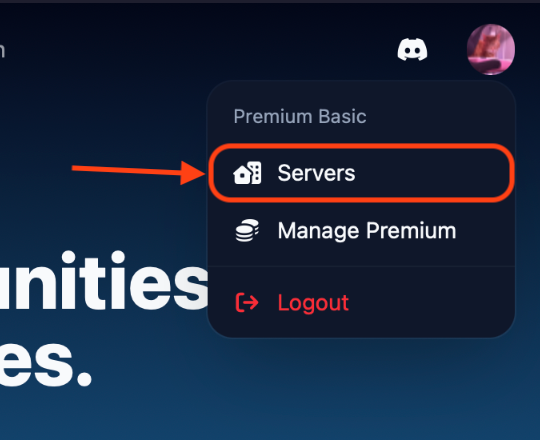
Go to the Points dashboard, click your avatar in the top right, and select Servers
Click on the server you want to manage, then head to the Settings page
Scroll down to the Message Reward card and toggle it off
Message rewards will stop immediately once disabled.
Controlling Which Channels Give Points
Instead of disabling message rewards entirely, you can limit which channels award points.
Denylist: block specific channels
Add channels to the Denylist to prevent those channels from awarding points. All other channels continue to give points normally.
To block all channels at once, click the Denylist input and select Deny All. You can then use the Allowlist to opt specific channels back in.
Allowlist: allow specific channels only
Channels in the Allowlist always award points, even if the denylist is set to deny all. Add the specific channels you want to reward activity in, and everywhere else will be excluded.
How they interact
Adjusting the Points Range
Use the Minimum and Maximum fields to control how many points each message awards. Setting both to the same number gives every message a fixed reward. Setting the minimum to 0 means some messages may award no points at all.
Item Modifiers
Members can purchase shop items that boost their message rewards. For example, a "Double Points Boost" item could double the points earned per message. These modifiers only apply to the member who purchased the item.
Advanced Economy Mode
If your server uses Advanced Economy Mode, message rewards come out of the server bank. If the bank doesn't have enough balance to cover a reward, that message won't award any points.
Message reward settings can be adjusted at any time in your server settings.