What is Economy Mode?
Economy Mode controls how points flow through your server. You can choose between two modes depending on how you want to run your server's economy.
Written By Adam
Last updated 7 months ago
Simple Mode (Default)
In Simple Mode, points are created freely. There's no central bank balance required to issue rewards. Think of it like a printer: points are generated and given to members on demand.
How it works:
Rewards (daily, weekly, etc.) are always paid out as long as the member is eligible
Game winnings (coinflip, dice) are always paid out
Refunds are always processed
If taxes are enabled, the tax amount is collected into the server bank
Item purchases add points to the server bank
This mode is great for servers that want a straightforward, low-maintenance points system without worrying about the server bank running dry.
Advanced Mode
In Advanced Mode, your server has a finite bank balance. All payouts rewards, games, and refunds come directly out of this bank. This creates a true zero-sum economy where points have to come from somewhere.
How it works:
The server bank must have enough balance before any payout is processed
If the bank can't cover a reward, game payout, or refund, the action is denied until funds are available
Item purchases by members add points to the server bank
Taxes are collected back into the bank
Rewards subtract from the bank; taxes on those rewards are returned to the bank
Example flow:
A member claims their daily reward of 100 points
The server bank is checked, it must have ≥ 100 points
100 points are deducted from the bank and added to the member
If a 10% income tax is enabled, 10 points flow back to the bank (net cost: 90 points)
This mode is ideal for servers that want a tightly controlled, realistic economy where the server bank needs to be actively funded (e.g. through item shop sales, taxes, or manual top-ups).
Comparison
How to Configure Economy Mode
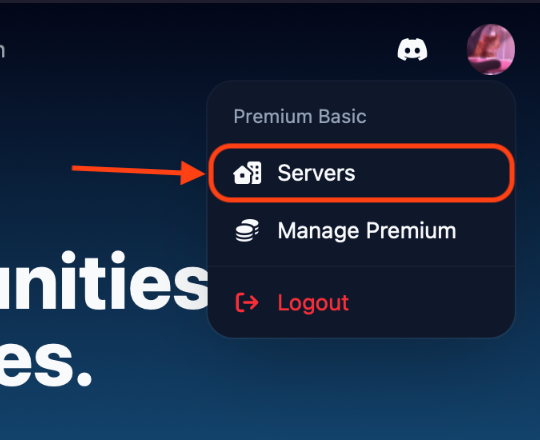
Go to the Points dashboard and click your avatar in the top right, then select Servers
Click on the server you want to configure
You'll land on the Leaderboard page. Head to the “Settings” page
Under Basic Customization, find the Economy Mode card
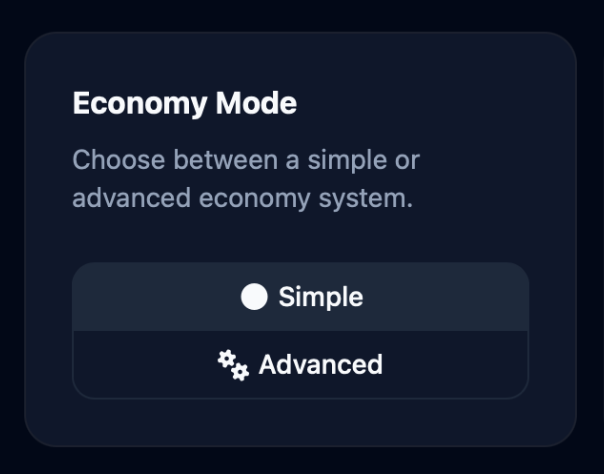
Select either Simple or Advanced
Make sure to save your changes!
Choosing a Mode
Use Simple Mode if you want an easy setup where members always receive their rewards and games always pay out. The bank is not a constraint.
Use Advanced Mode if you want a realistic economy with scarcity. You'll need to actively manage the server bank balance through taxes, item shop revenue, or manual adjustments to keep payouts flowing.
Economy Mode can be changed at any time in your server settings.